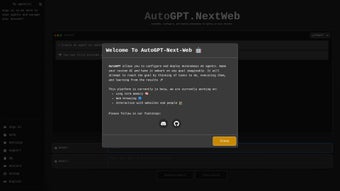

Download AutoGPT Nextweb – Web‑Based AI Agent Builder, Free & Secure
Overview: What AutoGPT Nextweb Brings to the AI Landscape
AutoGPT Nextweb is a cutting‑edge, web‑based AI platform that enables anyone—developers, marketers, educators, or hobbyists—to create, configure, and deploy autonomous AI agents without writing a single line of code. The service runs entirely in the cloud, which means users simply open a modern browser, log in, and start building agents that can browse the web, process data, generate content, or even interact with third‑party APIs. By leveraging OpenAI’s most recent language models (GPT‑4 and later), the platform delivers state‑of‑the‑art natural language understanding, making the agents feel surprisingly human‑like while still remaining under the user’s control.
The interface follows a minimalist design philosophy: a clear “Create New Agent” button, a drag‑and‑drop goal definition area, and a real‑time console that streams each reasoning step. This transparency is crucial for trust, as users can see exactly how the agent reaches a conclusion, pause execution, or inject new constraints on the fly. AutoGPT Nextweb also includes built‑in versioning, so each agent configuration is saved automatically, allowing users to revert to previous states or clone successful agents for new projects.
Community engagement is a core pillar—an active Discord server, a public GitHub repository, and regular webinars ensure that newcomers can quickly find help, while power users can contribute plugins, share templates, and discuss best practices. In short, AutoGPT Nextweb democratizes autonomous AI, turning sophisticated machine‑learning workflows into an accessible, browser‑native experience that scales from a single‑person prototype to a multi‑team production environment.
Key Features that Set AutoGPT Nextweb Apart
- Browser‑Only Deployment: No local installation required; launch agents instantly from any modern browser.
- OpenAI Integration: Seamless connection to GPT‑4 and newer models, guaranteeing state‑of‑the‑art language capabilities.
- Goal‑Driven Agent Creation: Define a clear objective and let the system generate a fully autonomous agent tailored to that purpose.
- Real‑Time Control Panel: Pause, resume, or stop agents at any moment, preserving resources and ensuring safety.
- Collaborative Community Hub: Access templates, share agents, and receive troubleshooting help via Discord and GitHub.
- Secure Session Management: End‑to‑end encryption for all communications, with optional API key storage for recurring projects.
- Auto‑Scaling Logs: Detailed execution logs and performance metrics appear in‑app, aiding debugging and optimization.
- Cross‑Platform Compatibility: Works on Windows, macOS, Linux, Android, and iOS browsers, making it truly universal.
- Extensible Plug‑in Architecture: Power users can add custom Python snippets, webhook calls, or third‑party integrations such as Zapier, Slack, and Google Sheets.
- Versioned Agent Library: Every agent is saved with a timestamped version, allowing easy rollback or cloning for new projects.
Beyond the headline features, AutoGPT Nextweb receives continuous updates that improve latency, expand template libraries, and introduce new integration points. For example, the recent “Data‑Connector” module lets agents pull data directly from RESTful APIs and store results in cloud spreadsheets without manual coding. The platform also supports multi‑agent orchestration, where one agent can hand off tasks to another based on predefined triggers—ideal for complex workflows like lead generation followed by automated email drafting. Each update is delivered automatically; users never need to download patches or restart the service. The combination of a zero‑install approach, deep OpenAI integration, and a modular plug‑in system makes AutoGPT Nextweb a uniquely flexible tool that can grow alongside the user’s ambitions, whether that means a quick prototype or an enterprise‑grade automation suite.
Installation, Usage, and Compatibility Details
Because AutoGPT Nextweb lives entirely in the cloud, the installation process is reduced to a few straightforward steps. First, navigate to the official website and click the “Start for Free” button. You’ll be prompted to sign in with a Google, GitHub, or email account; this creates a secure user profile that stores your API keys and saved agents. Once logged in, the dashboard appears, offering a clear “Create New Agent” call‑to‑action.
To launch an agent, simply enter a descriptive name (e.g., “Content‑Gen Bot”) and type a concise goal (“Write SEO‑optimized blog posts about renewable energy”). The platform then calls OpenAI’s API, builds a task‑oriented prompt chain, and spins up the autonomous agent. You can monitor progress in the live console, where each step—data retrieval, reasoning, output generation—is timestamped. If you need to intervene, the pause button halts execution, allowing you to edit the goal or inject additional constraints before resuming.
Compatibility: AutoGPT Nextweb runs on any device with a modern browser supporting WebSockets and HTTPS. Tested browsers include Chrome 116+, Firefox 115+, Safari 16+, and Edge 117+. Mobile users on Android 12+ and iOS 15+ experience the same feature set, though the UI adapts to smaller screens for optimal touch interaction. Because no native binaries are installed, there’s no need to worry about driver conflicts or OS‑specific patches.
For power users, the platform offers an API endpoint that can be called from external scripts, enabling integration into CI/CD pipelines or custom dashboards. Documentation provides example cURL commands and Python snippets, making it simple to automate agent creation at scale. Updates are delivered automatically; there’s no manual patching, and each release includes a changelog visible in the “Updates” tab of the dashboard. In addition, the service respects privacy regulations—session data is retained only as long as the user’s account remains active, and all logs can be exported or deleted on demand.
Pros, Cons, FAQ, and Final Thoughts
Pros
- Zero‑install, browser‑based access removes friction for new users.
- Deep integration with OpenAI ensures top‑tier language performance.
- Intuitive pause/stop controls keep autonomous agents safe and cost‑effective.
- Robust community support via Discord and GitHub accelerates learning.
- Cross‑platform compatibility means you can work from any device.
- Extensible plug‑in system allows advanced customisation without leaving the browser.
Cons
- Reliance on an internet connection; offline usage is not possible.
- Free tier is limited by OpenAI API quota, which may require a paid upgrade for heavy users.
- Advanced custom scripting still requires some programming knowledge.
- Performance depends on OpenAI’s service status and latency.
Frequently Asked Questions
Is AutoGPT Nextweb really free to use?
The core platform is free, but it consumes OpenAI API credits. You can start with a modest free quota, and larger projects may need a paid OpenAI plan.
Can I run AutoGPT Nextweb on a corporate network with strict firewalls?
Yes, as long as outbound HTTPS (port 443) is allowed. The service uses standard web protocols and does not require special ports.
How secure is my data when I create agents?
All communication is encrypted with TLS 1.3. API keys are stored in hashed form, and you can opt to use temporary keys that expire after each session.
Can I export an agent for use outside the web app?
Agents can be exported as JSON configuration files, which can be imported into other AutoGPT‑compatible environments or self‑hosted instances.
What browsers are officially supported?
Chrome 116+, Firefox 115+, Safari 16+, and Edge 117+ on desktop; Android 12+ and iOS 15+ on mobile devices.
Conclusion & Call to Action
AutoGPT Nextweb stands out as a powerful, accessible gateway to autonomous AI without the overhead of traditional development environments. Its browser‑only design, combined with deep OpenAI integration and thoughtful safety controls, makes it ideal for both novices and seasoned AI practitioners. While the reliance on an internet connection and API costs are considerations, the overall value proposition—rapid agent creation, cross‑device flexibility, and a thriving community—far outweighs the drawbacks. Ready to experiment with your own self‑directed AI agents? Free download today, sign up in seconds, and start building the next generation of intelligent automation.



.png)



